Posting every week gets hard when you can't find the clip you made.
Number the top folders, keep raw clips in one place, and give each day and slot its own folder.
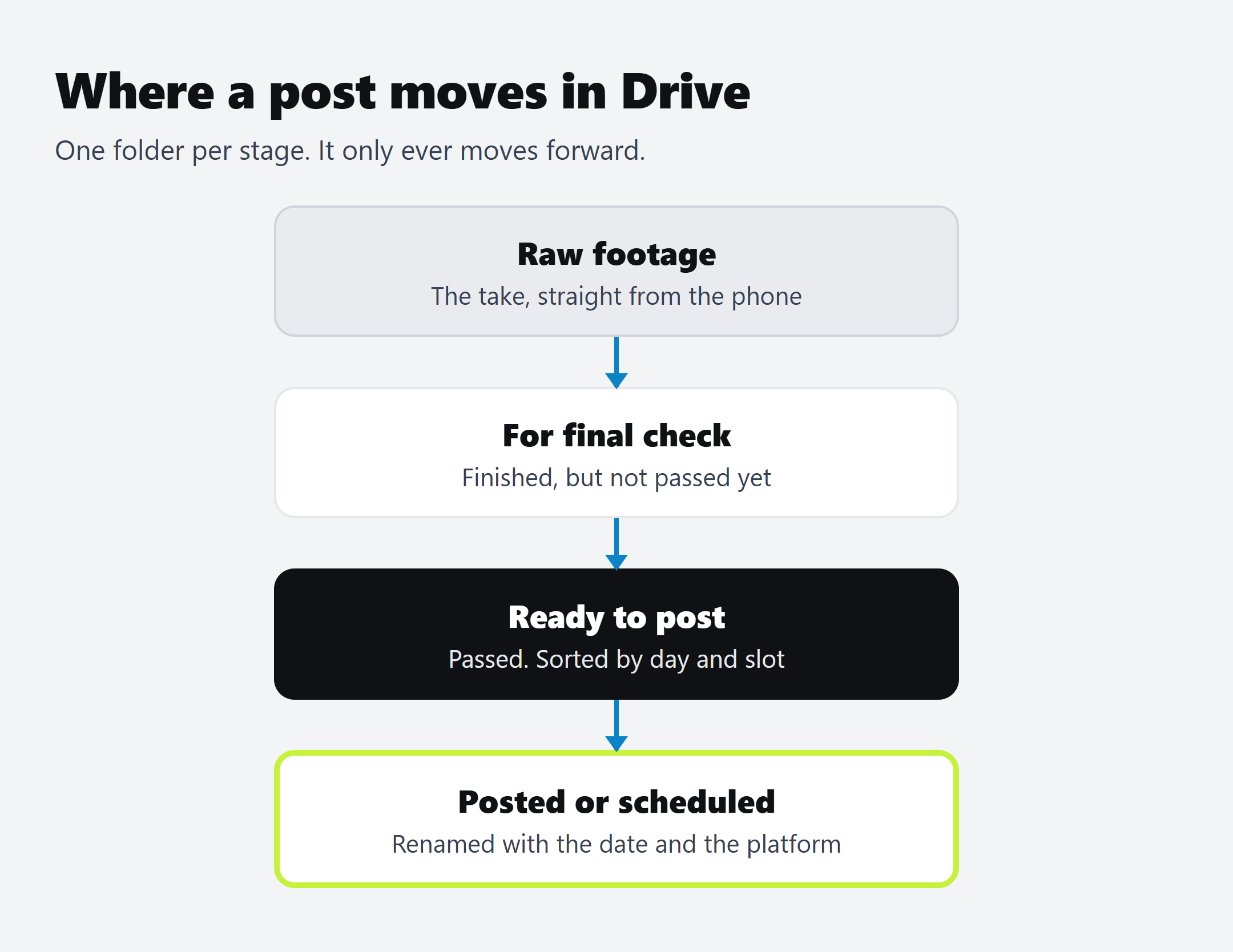
A post only moves forward: raw, checked, ready, then posted.
Keep names short, and move folders instead of remaking them.
You filmed it on Tuesday. On Friday, you can't find it. You search, scroll, and open the wrong folder twice. The post goes out late, or not at all.
A Google Drive folder structure fixes that. It doesn't need to be clever. It needs to be the same every time.
Google Drive folder structure: one folder per day, one per slot
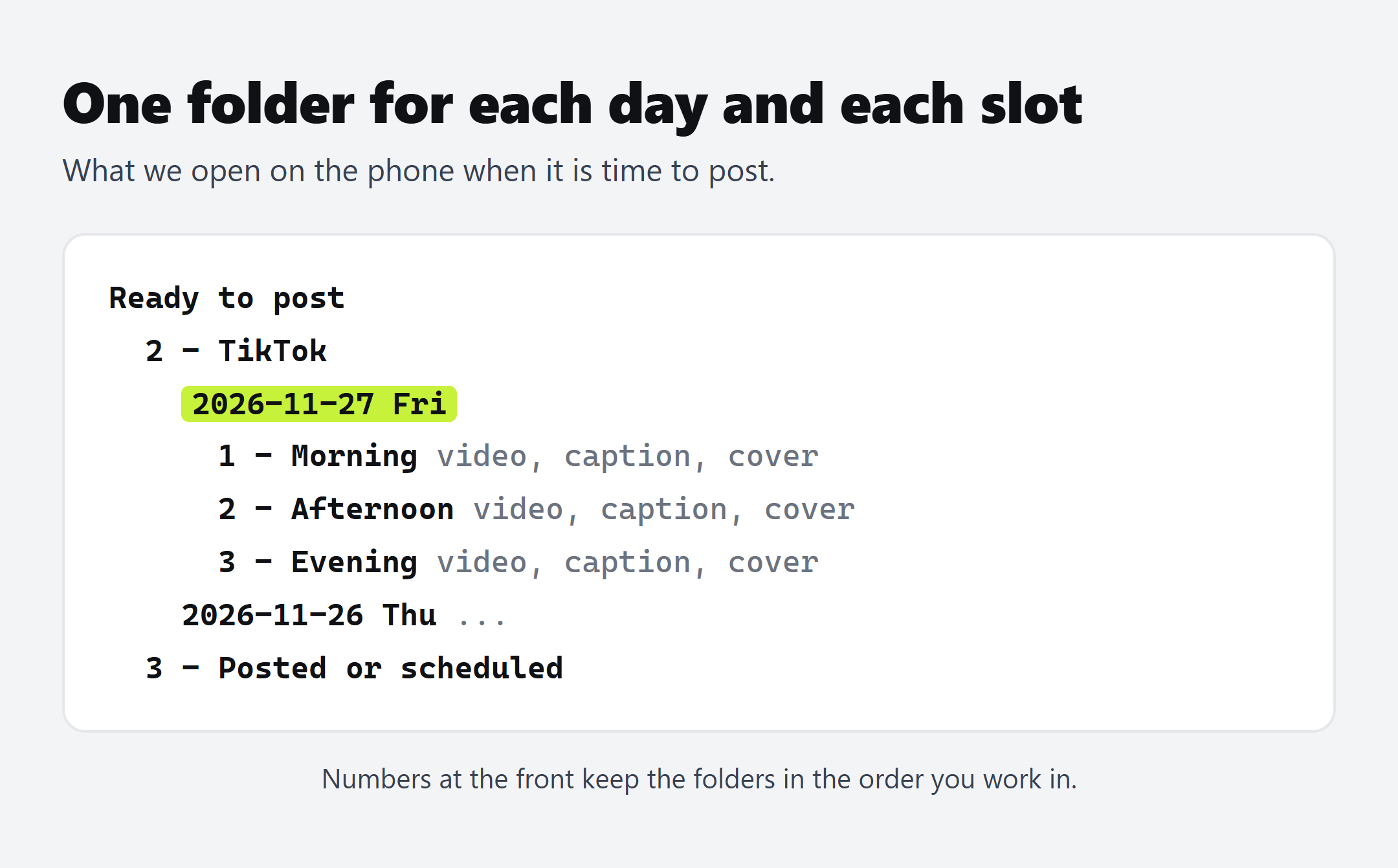
We post from a phone, so the folder for today has to be one tap away. This is the one we use.
Each slot folder holds everything for that one post: the video, the caption and the cover. When it's time to post, you open one folder and it's all there.
Above that, the top level is split by job and numbered: short videos, lives, blog, website, emails and leads, giveaways. The numbers keep them in the order we work in.
In plain words: a slot is the time of day a post goes out. Ours are morning, afternoon and evening.
Let each post move forward, never back
Files get lost when nobody knows what stage they're at. So we give each stage its own folder.
Raw footage: the take, straight from the phone. All raw clips live in one place.
For final check: finished, but not passed yet.
Ready to post: passed, and sorted by day and slot.
Posted or scheduled: renamed with the date and the platform.
A post only ever moves forward. So at any moment you can tell what's done and what isn't, just by which folder it's in.
Five rules that keep it tidy
Number the top folders. Drive sorts by name, so 1 - Morning comes before 2 - Afternoon.
Keep every raw file in one place. Don't keep videos only on your computer. Put them in Drive.
Keep names short. Windows can stop working with a file path longer than 260 characters. A long chain of long folder names gets there fast when Drive syncs to a PC.
Move folders, don't delete and remake them. In our experience, a moved or renamed folder keeps its links. A remade one doesn't.
One Google Doc for each post. The idea, the script and the caption go in one Google Doc inside its folder. Don't scatter them.
Google's own help page on organising your files in Drive says the same thing in other words: start simple, and put folders inside folders.
Set it up tonight
Make one top folder for posts. Inside it, make 1 - Raw, 2 - For final check and 3 - Ready to post.
Inside 3 - Ready to post, make a folder for tomorrow, named by date and day.
Inside that, make a folder for each post you plan to make.
Put one Doc in each, with the idea, script and caption.
Do the same again tomorrow. It takes two minutes.
Try this: open Drive on your phone and find tomorrow's post. If it takes more than three taps, the folders aren't done yet.
It also stops you running out of ideas
When each day has a folder, the empty ones show you what's missing. A written routine tells you what goes in. A tracker for ideas keeps the next ones close. And if you have none, the What to post guide is a good place to start.
Start with the idea. Answer a few quick questions on the free What to post page and get ideas for posts, a free thing to give away, and something to sell. Then give the best one a folder.
Oloye spent 14 years behind the scenes in banks and marketing: marketing technology, CRM and email, and the changes that make a team work better. Now he builds with AI and shares what he learns as he goes. He lives in Kent with his family.