Oloye.
Content

Too Many Ideas? Park Them in a Free Project Tracker

Too many ideas and nothing posted? Park every new idea in a free project tracker, then post one and finish it. Here's the simple table we use.

5 min read
Too Many Ideas? Park Them in a Free Project Tracker

In short

  • Why a new idea feels so good, and why it stops you finishing.
  • The one rule: every new idea is parked first.
  • The simple project tracker we use, field by field.
  • How to set yours up tonight, then pick one idea to post this week.

You're halfway through setting something up for your business. Then a new idea lands. It's exciting, and it feels more important than the thing in front of you.

So you start that instead. A month later you have five things half built and none of them working.

Post ideas work the same way. There are ten in your notes app, and nothing went out this week.

You don't have too few ideas. You have nowhere to put them. A free project tracker fixes that.

In plain words: a project tracker is a list of your ideas and builds, with one word next to each saying where it is.

Why a new idea stops you finishing

A new idea feels good because it's clean. Nothing has gone wrong with it yet. The thing you're halfway through has all the boring, fiddly parts left.

So jumping to the new idea feels like progress. It isn't. It's the tool trap: building something new to hide from the hard part of the old one.

The answer isn't to stop having ideas. It's to give every idea a home, so you can stop carrying it around in your head.

The one rule: park it first

We set one rule on 5 November 2026, and it changed how we work.

Every new big idea goes in the tracker as Parked. Nothing gets built until I say so.

That's it. When an idea comes up, in a chat, on a walk or halfway through another task, it gets written down. Then we go back to what we were doing.

Parking an idea isn't saying no. It's saying not yet. The idea is safe, it's written down properly, and it'll be there when there's room for it.

Good to know: we did this because we wanted to put out more content and stop building new things for a few months. The tracker is how we kept the ideas without losing the focus.

The free project tracker we use

Ours is a table called Roadmap, in Airtable. Each row is one idea. These are its columns:

Column What goes in it
Idea The idea in a few words
Status Parked, Next up, Building, Built or Dropped
Block Which part of the business it helps, like leads or onboarding
What it does One or two lines, in plain words
How it would work The rough steps, if you know them
Watch out for Anything that could go wrong, or a cost
Content idea How it could become a post once it's built
Added The date it went in

The Status column does most of the work. Most rows sit at Parked. Only a few ever move to Next up, and only once the last thing is finished.
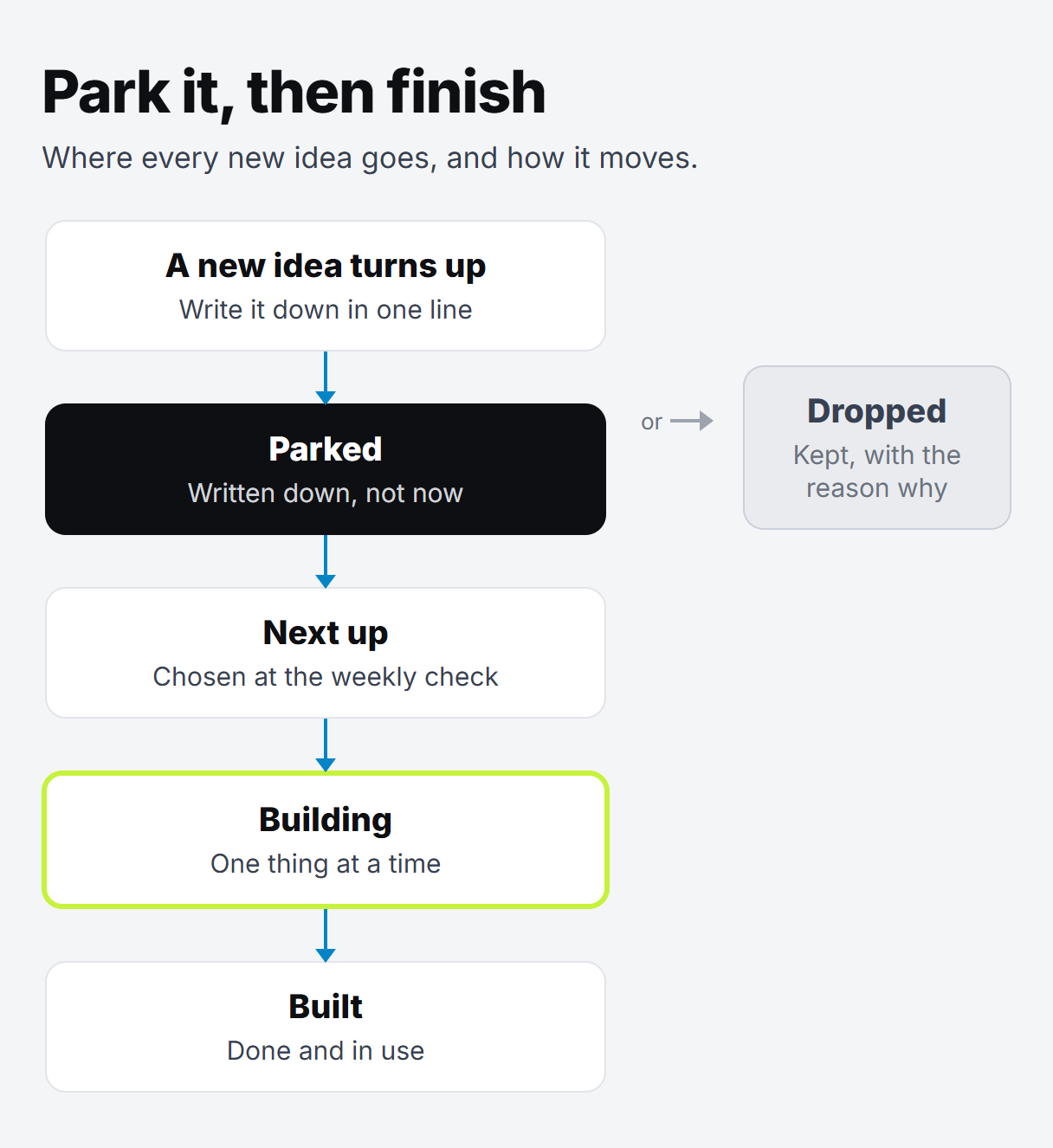
A simple flow in five boxes: a new idea, then Parked in the tracker, then Next up, then Building, then Built. A side arrow from Parked goes to Dropped.

The Content idea column is our favourite. Every build is a chance to show people how it works. Writing that down at the start means nothing we build is wasted.

If you're new to Airtable, we wrote about using it as a simple CRM for a small business. The same base can hold your tracker as a second table.

How to set up your project tracker tonight

You can do this tonight.

  1. Open a new table. In Airtable, or in a Google Sheet if you'd rather.
  2. Add the columns above. Leave out any you don't need. Idea, Status and Added are the ones that matter most.
  3. Make Status a dropdown. In Airtable, that's a single select field. Add the five choices: Parked, Next up, Building, Built and Dropped.
  4. Empty your head into it. Every idea you've been carrying around goes in as Parked. It's a strange relief.
  5. Pick one thing to finish. Set it to Building. Only one, until it's done.

Try this: next time a new idea lands while you're working, give yourself one minute. Add the row, set it to Parked and go back to what you were doing.

When a parked idea gets built

Once a month, or whenever something is finished, look down the Parked rows. Pick the one that would help most right now and move it to Next up.

Some ideas will look less exciting after a few weeks. That's useful too. Set them to Dropped. You haven't lost anything, because the row stays there as a record.

If you're not sure which idea to pick, start with the ones that take boring tasks off your plate. Our guide to where to start with AI in a small business has more on choosing. And once a build is running, getting every sign-up into one list is a good example of a small one that keeps paying back.

The same rule works for post ideas

Our post ideas live in their own table, called Content. A new one goes in as an Idea, and old ones or ones on hold sit as Parked. Then we pick a few for the week and make those. The rest wait, written down, so nothing is lost.

You can do the same with a column in your tracker. Park every post idea. Pick one. Post it. Then pick the next. We wrote more on finding ideas in what to post on TikTok when you have no ideas.

Not sure which idea to post first?

Try our free What to post page. Answer a few quick questions about what you know and what people ask you, and get ideas for posts, a free thing to give away and something to sell one day.

Park the rest. Post one. Then pick the next.

Written by

Oloye Adeosun
Oloye Adeosun

Founder

Oloye builds AI systems for content creators and business owners, and has been building marketing systems for over 3 years. Creators get a content machine. Business owners, coaches included, get workflows that stop them losing leads. He lives in Kent with his family, and the point is the same for him as for you: more time for the work and the people that matter.

FAQ

Questions about this post

What is a project tracker?

A simple list of your ideas and builds, with one line on where each one is. Ours says Parked, Next up, Building, Built or Dropped.

Do I need Airtable for this?

No. Airtable is what we use, but a Google Sheet with the same columns works just as well. The rule matters more than the tool.

What does parking an idea mean?

Writing it down in your tracker and leaving it there. It isn't a no. It's a not yet, so you can finish what you're working on first.

Who decides when a parked idea gets built?

One person. In our case, it's me. Nothing moves from Parked to Building until I say so.

What task would you hand over first?

A free call. We'll find the first task worth automating, and you'll know the price before anything starts.