Oloye.
Content

What to Post on TikTok When You Have No Ideas

Don't know what to post on TikTok? Stop scrolling for ideas. Here's how to find posts in what you already know, with five ideas you can film today.

4 min read
What to Post on TikTok When You Have No Ideas

In short

  • Why scrolling for ideas leaves you with nothing to post.
  • Four simple questions that turn what you already know into posts.
  • Five post ideas you can film today, with no new skills.
  • How to pick one idea and test it this week.

You open TikTok to post something. The camera's ready. Your mind goes blank.

So you scroll for ideas. An hour later, you've watched fifty videos and posted nothing.

If you don't know what to post on TikTok, you're not short of ideas. You're looking for them in the wrong place.

In plain words: the best ideas for your posts don't come from other people's feeds. They come from what you already know.

Why scrolling for ideas doesn't work

Scrolling feels like research. It isn't. It's the watching trap: you keep watching other people post, waiting for an idea to land, and it never feels like yours.

Even when you find one you like, it belongs to someone else's life. You try to copy it, it feels fake, and you don't post it.

The ideas that work come from your own week. The problem is that you're too close to them to see them.

What to post on TikTok: start with four questions

Get a pen, or open your notes app. Answer these four questions in a few words each. Don't think too hard.

  1. What do you spend most of your day doing? Your work, looking after people, a hobby, whatever fills your hours.
  2. What do people come to you for? Advice, a fix, a recommendation, someone to talk things through with.
  3. What did you have to work out the hard way? Money, a move, your health, an app that nobody explained.
  4. Who were you five years ago? Someone a few steps behind you right now is that person.

Every answer is a post. Some are a whole series.

Good to know: these are four of the eight questions on our free What to post page. We built it for exactly this problem.

A friend of mine wanted to start making videos. He was stressed and didn't know where to begin. So I asked him a few questions like these. What do you actually want to make? Who for? A few answers later, he had his topic: kids' stories and nursery rhymes. He didn't need to learn coding. He needed someone to ask the right questions.

Five TikTok content ideas you can film today

Take your answers and try one of these. Each one works for almost any topic.

Idea What you say Comes from
The question you always get "People always ask me..." then answer it Question 2
The mistake you made "I got this wrong for years..." then what you do now Question 3
What I do instead "Most people do X. What I do instead is Y." Questions 1 and 3
Five years ago "If you're where I was five years ago, start here." Question 4
A normal day Show one real part of your day, and say one thing you learned Question 1

None of these need a trend, a ring light or a script. They need one honest sentence from your own life.

Try this: pick the idea that made you think "oh, I could say that". Film it on your phone today, in one take. Rough is fine.
How to pick one idea and test it

You don't need a perfect plan. You need one idea and a week.

  1. Pick the idea that feels most like you. Not the cleverest one. The one you could talk about without notes.
  2. Post about it three times this week. The same idea from three angles: a question, a mistake, a tip.
  3. Watch what people ask. The comments tell you what they want next. That's your next post.

TikTok's own Creator Academy has the basics on filming and posting, and the help page on making videos walks you through the buttons. Use them for the how. Keep the what for your own life.

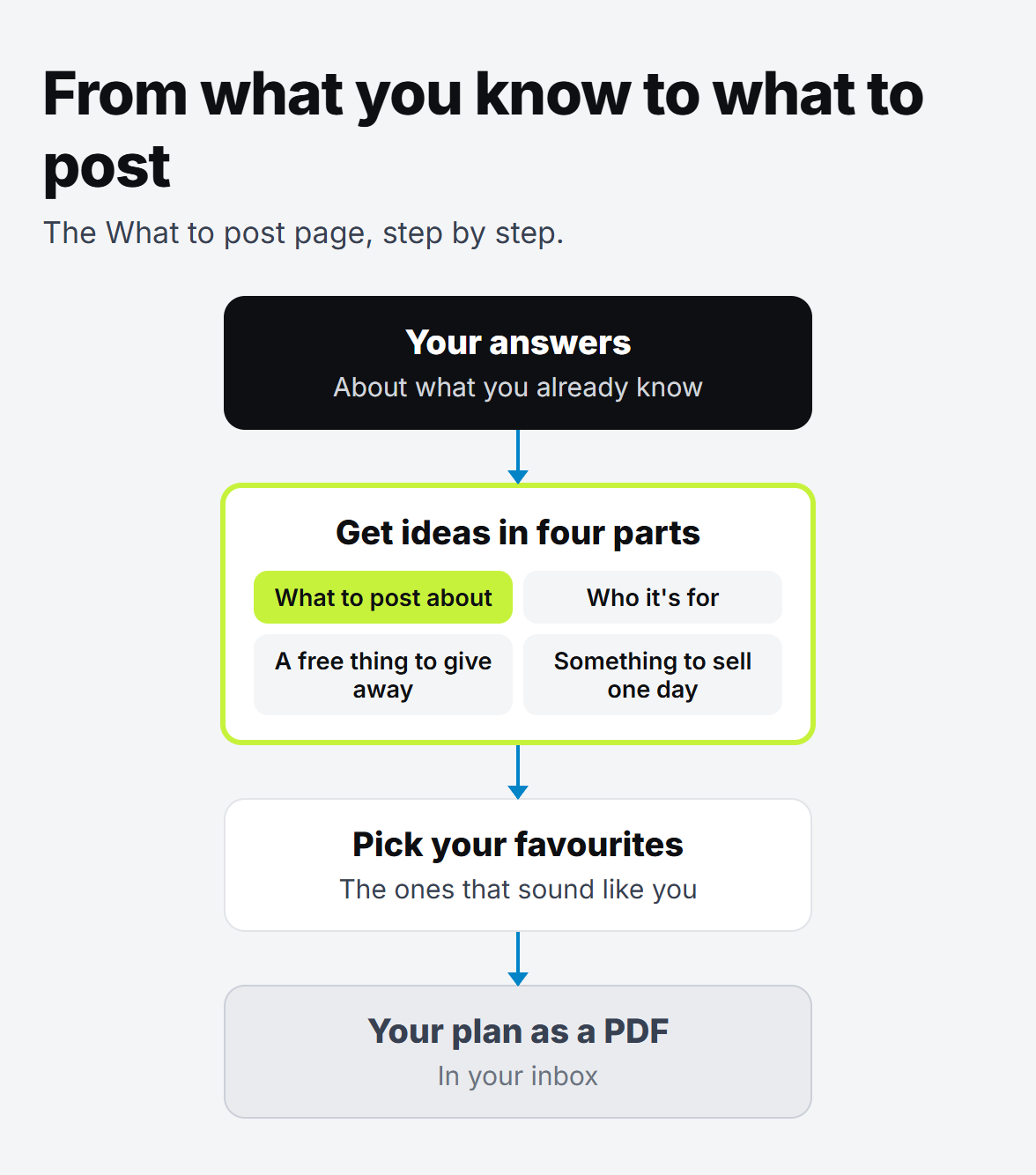
A simple flow in four boxes: your answers about what you know, then ideas in four parts, then pick your favourites, then a plan as a PDF in your inbox.

What comes after the first posts

Posting gets people's attention. But attention on TikTok comes and goes, and the app decides who sees your next post.

So it helps to think one step ahead. A small free thing to give away, and one day something to sell, gives that attention somewhere to go. We wrote about why in 10k followers mean nothing without an email list. If you want the cheapest way to start, there's the zero-dollar owned pipeline for creators, and how to get every sign-up into one list once you have a few.

You don't need any of that today, though. Today you need one post.

Get your ideas in a few minutes

If the four questions above still leave you stuck, let us do the asking. Our free What to post page asks a few quick questions about what you already know. Then it gives you ideas in four parts: what to post about, who it's for, a free thing to give away and something to sell.

Pick your favourite in each part, and we'll email you a simple plan as a PDF. It's free, and the ideas are yours to try.

Your next post is already in your head. Go and find it.

Written by

Oloye Adeosun
Oloye Adeosun

Founder

Oloye builds AI systems for content creators and business owners, and has been building marketing systems for over 3 years. Creators get a content machine. Business owners, coaches included, get workflows that stop them losing leads. He lives in Kent with his family, and the point is the same for him as for you: more time for the work and the people that matter.

FAQ

Questions about this post

What should I post on TikTok if I have no talent or skills?

Start with what you already know from your day: your work, the things people ask you about, and what you had to learn the hard way. That's enough for your first posts.

How do I find my niche on TikTok?

Answer a few honest questions about what you know and what people come to you for. Then pick one idea, post about it three times in a week, and see which one people ask questions about.

Should I copy what's trending?

You can use a trend's format, but the idea works best when it comes from your own life. Copied ideas sound like everyone else's.

Is there a free tool to help me decide what to post?

Yes. Our free What to post page asks a few quick questions and gives you ideas for what to post about, who it's for, a free thing to give away and something to sell.

What task would you hand over first?

A free call. We'll find the first task worth automating, and you'll know the price before anything starts.