Oloye.
Leads

Simple CRM for Small Business: One List in Airtable

A simple CRM for small business doesn't need a big tool. One Airtable table, one row per person, and a stage so you know who to reply to next.

4 min read
Simple CRM for Small Business: One List in Airtable

In short

  • Why leads spread across DMs, forms and inboxes get forgotten.
  • The columns and stages we use in our own Leads table.
  • How to set up a simple CRM in Airtable.
  • How the table fills itself once the rest of the system is joined up.

Someone comments on your post. Someone else fills in your website form. A third person sends a DM on a Sunday night. A week later you can't remember who asked for what, and two of them have gone quiet.

They were interested. They just got lost between three different places.

A simple CRM for small business fixes that. Not a big tool with fifty buttons. One list, in one place, that you own.

In plain words: CRM just means a list of the people who find you, and where each one is up to. If you keep it in one table, you have a CRM.

Why leads get lost when they live in five places

Most small businesses already have the names. They're just spread out. Some are in Instagram messages, some in an email inbox, some in a notes app, some in your head.

Each place works on its own. The trouble starts when you need to answer one simple question: who should I reply to today? Nobody can answer that across five apps. So the quiet ones get missed, and they're often the ones who were ready to buy.

What helps is one table that every door leads into.
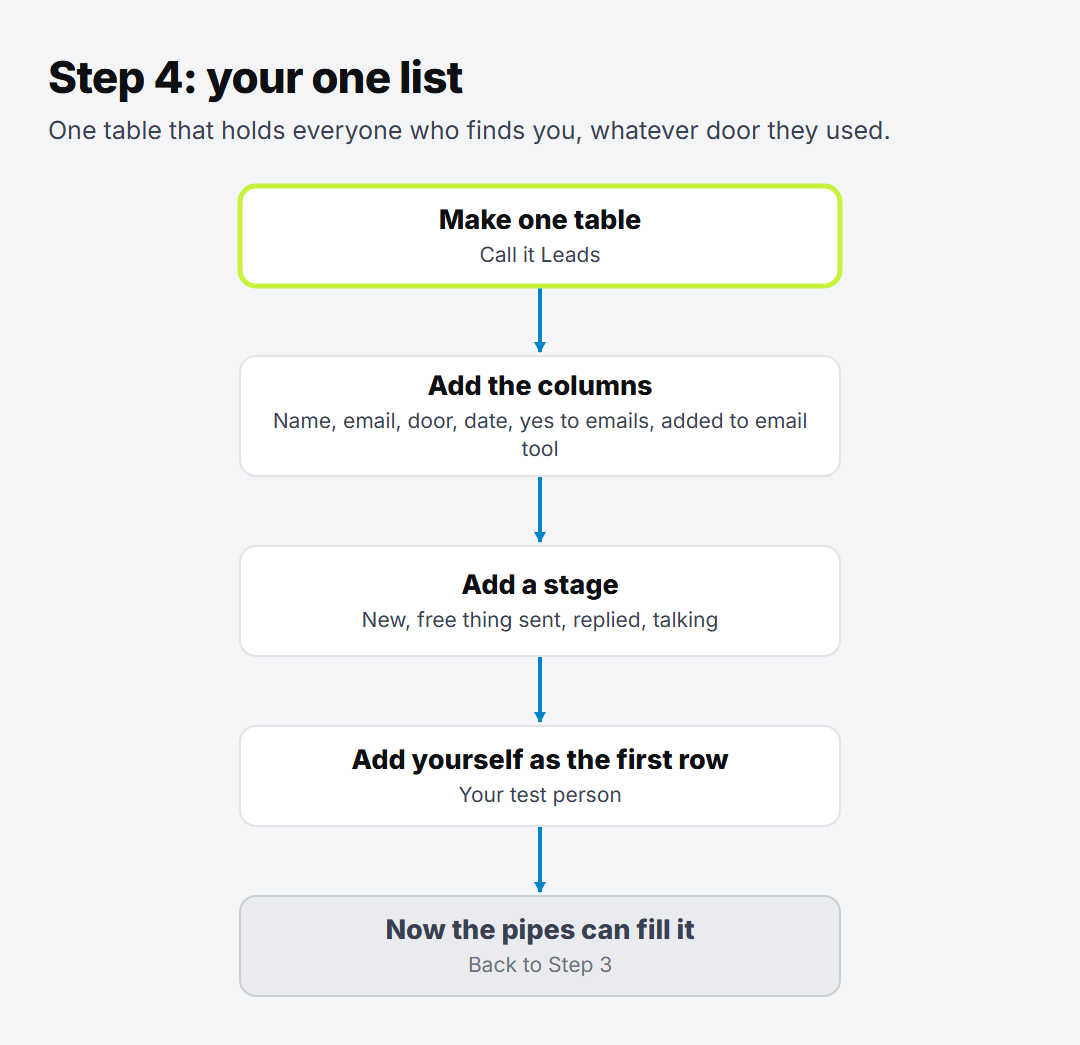
The steps to set up one list: make one table called Leads, add the columns, add a stage, add yourself as the first row, then the rest of the system can fill it

What a simple CRM for small business needs

Ours is an Airtable table called Leads. It started small and it's still small. These are the columns that do the work:

Column What it's for
First name So every reply starts with their name
Email The one thing you need to reach them, on any app or none
Platform Where they came from: Instagram, TikTok, your website
Date in The day they found you
Consent to email Did they say yes to hearing from you?
Stage Where they're up to
What they said Their words, so you know what they need

That's it to start. We added a few more later, like a "Days waiting" count, once we knew we needed them. Start with fewer columns than you think. You can always add one.
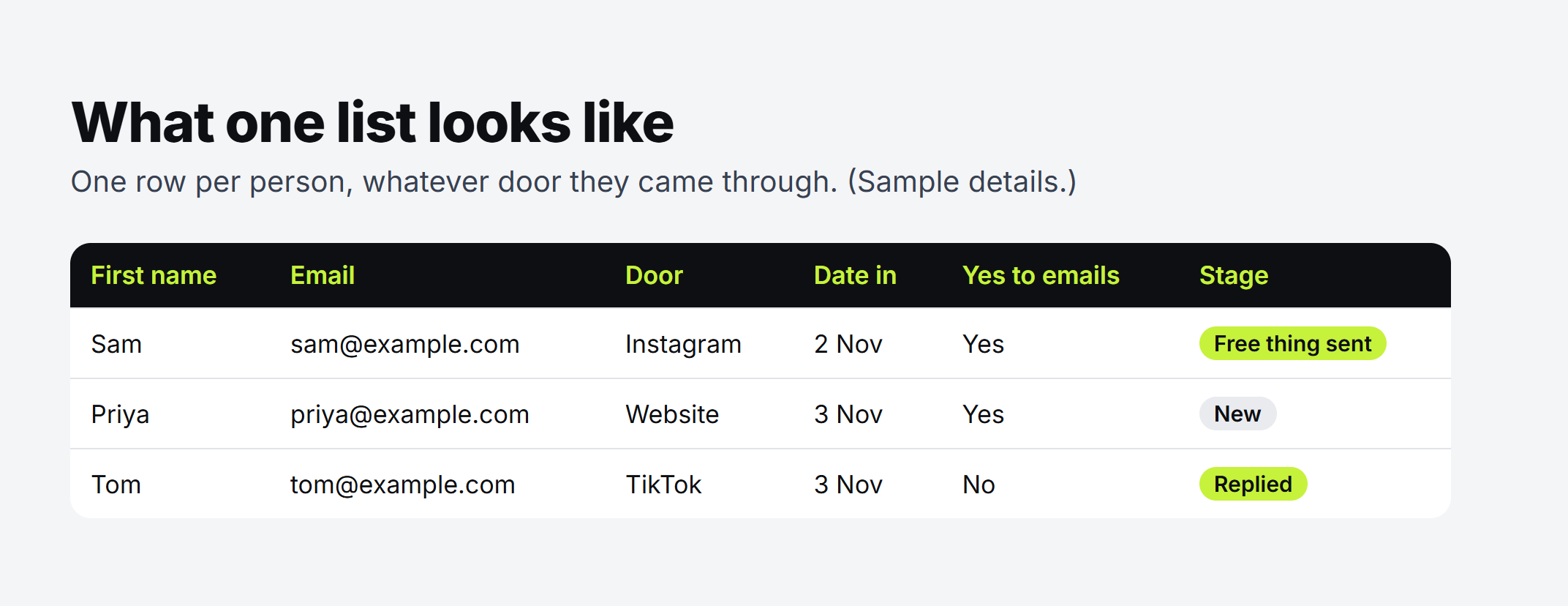
A sample Leads table: three people with first name, email, the door they came through, the date in, yes to emails, and their stage

A stage for every person

The stage is what turns a list of names into something you can act on. Ours has these:
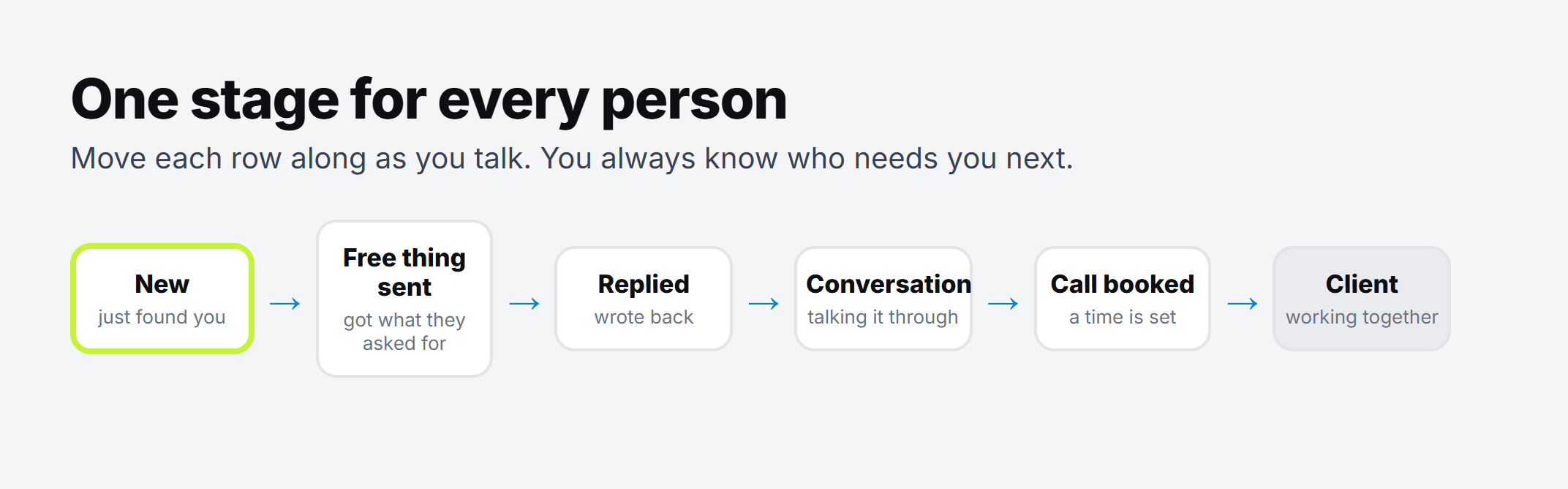
The stages a person moves through: New, Free thing sent, Replied, Conversation, Call booked, then Client

Every morning you can filter by stage and see who's waiting. Someone sitting on "Replied" for three days needs an answer today. Someone on "New" may just need the thing they asked for.

We also keep a "Not now" stage. Some people aren't ready, and that's fine. They stay on the list instead of disappearing.

How to set it up in Airtable

You can do this tonight. No code.

  1. Make a free Airtable account and a new base. Call it something plain, like "My business".
  2. Add one table called Leads. If you'd rather start from a template, Airtable has a lightweight CRM template you can trim down.
  3. Add the columns from the table above. Make Email an email field and Stage a single select, with your stages as the options.
  4. Add yourself as the first row. You're the test person. If your own row looks right, the setup works.
  5. Add the people you already have. Go through your DMs and inbox once and add each person, with the stage they're really at.

Good to know: Airtable has a free plan, and a small list fits on it. Check Airtable's plans page for what's included today, because it changes.

Let the table fill itself

Typing names in manually is fine for the first week. After that it becomes another task you skip.

So the next step is joining the doors to the table. Our website forms already land in Leads on their own, through a tool called Make. We showed exactly how in website forms to Airtable with Make. If you don't have a website, an Airtable form writes straight into the table, and we walked through that in a free way to catch every enquiry from your posts.

Once the rows come in by themselves, the table stops being a chore. It's just where you look each morning.

Try this: before you build anything else, add the last ten people who messaged you. Give each one a stage. You'll see straight away who you forgot to answer.

Why it matters

Followers live on someone else's app. If your reach drops, you can't get them back. We wrote more about that in why 10k followers mean little without an email list.

A table of names and emails is yours. Nobody can switch it off. And because every person has a stage, nobody who finds you gets lost in the gaps.

If you want every column and stage we use on one page, ask for the free guide in the form on this page. It's called "Followers you can't email", and you can copy it into Airtable or a Google Sheet tonight. And if you want more free guides like this one, they're all on our free things page.

Written by

Oloye Adeosun
Oloye Adeosun

Founder

Oloye builds simple automations that save small businesses time and money, and has been building marketing systems for over 3 years. He lives in Kent with his family, and the whole point is the same for him as for you: more time for the work and the people that matter.

FAQ

Questions about this post

Do I need a paid CRM to start?

No. A single Airtable table on the free plan is enough to start. Check Airtable's plans page for what the free plan includes today.

What columns should a simple CRM have?

First name, email, where they came from, the date they came in, whether they said yes to emails, and a stage. Add more only when you find you need them.

What is a stage?

A short label for where each person is, like New, Free thing sent, Replied or Call booked. You move it along as you talk, so you always know who needs you next.

How do people get into the table?

You can type them in at first. Later, a tool like Make can add every new sign-up for you, from your website forms or an Instagram keyword.

What task would you hand over first?

A free call. We'll find the first task worth automating, and you'll know the price before anything starts.