Lead Follow Up System: A Morning List of Who to Reply To
A simple lead follow up system: one morning list of who's new, who's waiting and a reply to start from, built with Airtable and Claude. You still hit send.
What a morning list of leads shows, with a sample.
How ours works, using Airtable and Claude.
How to set up your own, with a prompt to copy.
Why the replies stay as drafts until you send them.
You open your phone in the morning. There's a DM from last week, a form from Tuesday and an email you starred. You know someone's waiting. You just can't see who.
A lead follow up system fixes that with one short list: who's new, who's been waiting, and a reply to start from. You still send every message yourself.
In plain words: a lead follow up system is a set way of making sure everyone who shows interest gets a reply. It can be as small as one table and five minutes each morning.
What the morning list shows
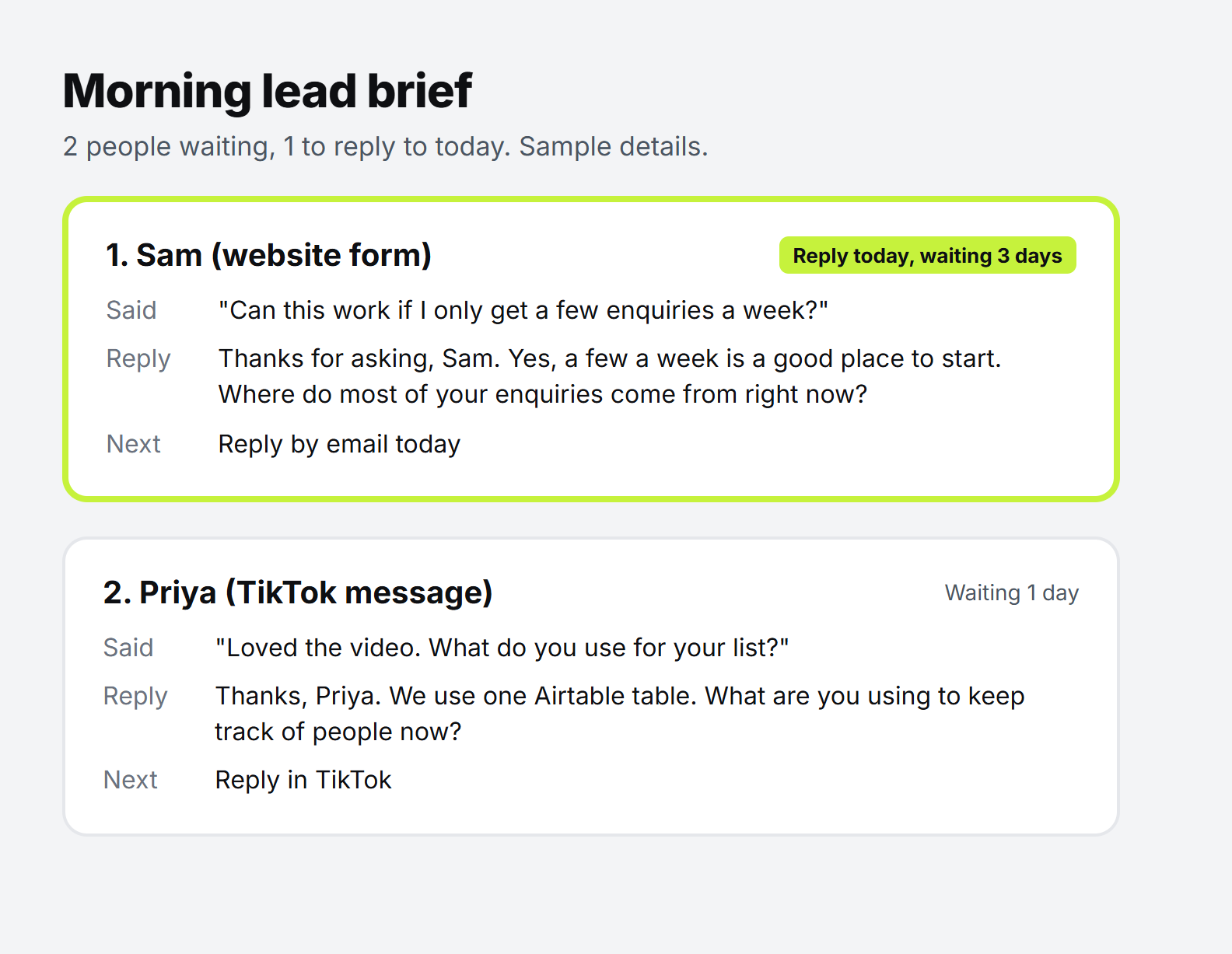
This is the shape of ours, with sample details:
The order does the work. New people who haven't had a reply come first, then whoever has waited longest. Anyone waiting 3 days or more gets marked "reply today".
That's all you need from it. You don't have to think about who you've forgotten, because they're at the top.
How our lead follow up system works
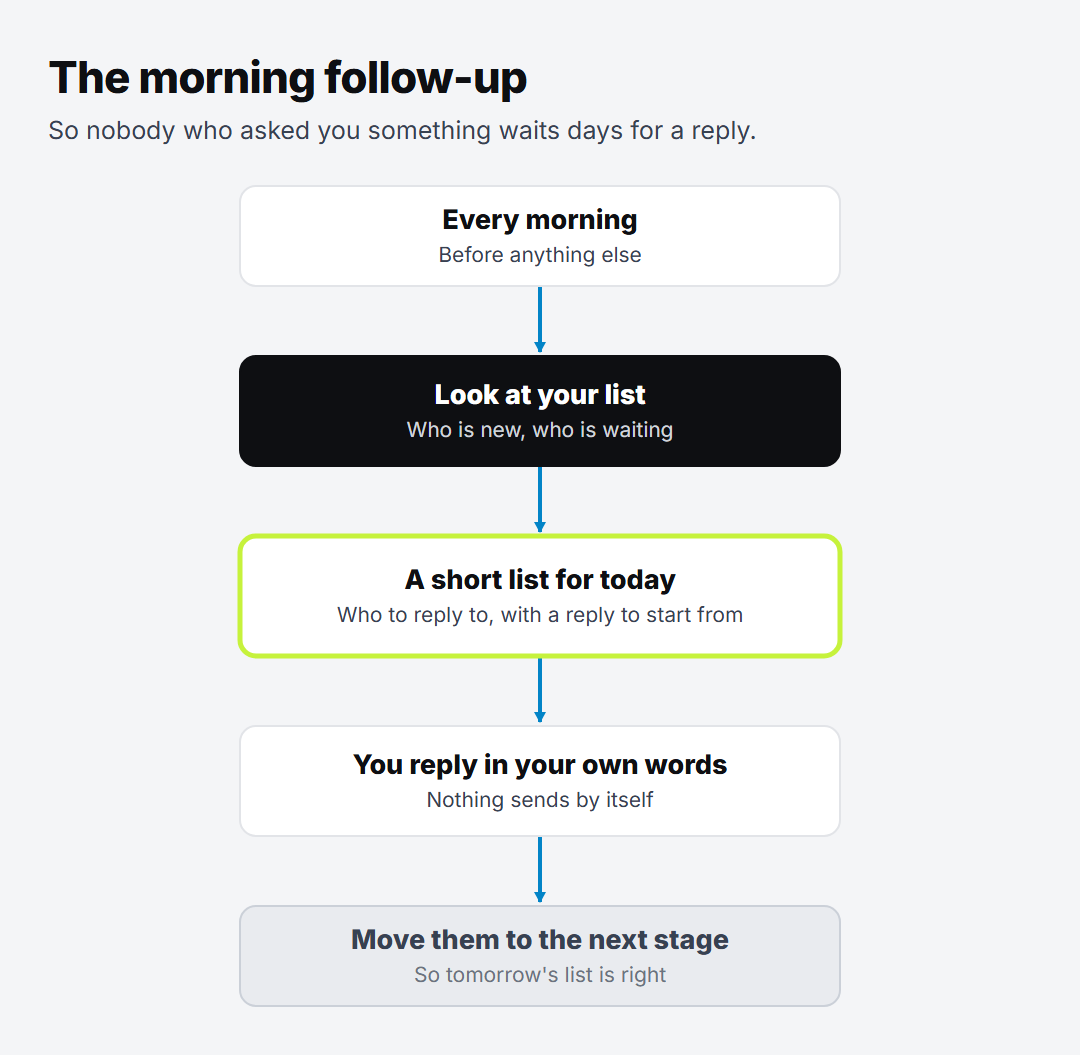
We built ours on 25 October. It has one table and one Claude skill, and it doesn't run on a timer. We start it when we ask.
Claude reads our Leads table. It skips anyone marked as a client or "not now".
It sorts them. New people first, then whoever has waited longest.
It writes one reply per person. A sentence or two: thank them, answer what they asked, then ask one question about them.
It saves the list as a Google Doc, so we can read it on a phone.
We reply. Then we tell Claude who we've replied to, and it updates the row.
Our list is still small, so we can't tell you how this holds up with hundreds of names.
Step 2: Add a column for days waiting. It counts the days since your last contact, or since they came in if you haven't replied yet. In Airtable, make a formula field with your own column names:
Step 3: Sort it. Biggest number at the top, and hide anyone who's already a client. That's your list, even with no Claude at all.
Step 4: Ask Claude for the replies. Paste your list in with this prompt:
Copy this: Here is my list of leads. Put anyone new that I haven't replied to first, then whoever has waited longest. Mark anyone waiting 3 days or more as "reply today". For each person, write a reply I can start from: one or two short sentences, plain and warm. Thank them, answer what they asked, then ask one question about them. No pitch, no price, no links. Don't make anything up about them. If you can't tell what they meant, say so.
Good to know: this is real people's information. Leave out anything Claude doesn't need, like phone numbers.
Step 5: Reply, then update the row. Change the stage and the last contact date, so tomorrow's list is right.
A reply to a real person can't be taken back, and Claude can misread what someone meant. So it never sends anything. It does the sorting and gives you a first draft, and the message that goes out is yours.
Try this: tomorrow morning, before you open anything else, write down the three people who have waited longest for a reply. Answer those first.
Want to know where else people are slipping away? Take the free Lead leak check. It's 6 quick questions, and you get a score out of 100, your 3 biggest leaks, and the first fix for each.
Oloye builds AI systems for content creators and business owners, and has been building marketing systems for over 3 years. Creators get a content machine. Business owners, coaches included, get workflows that stop them losing leads. He lives in Kent with his family, and the point is the same for him as for you: more time for the work and the people that matter.