How one person stays one row, even if they sign up twice.
How to add only the people who said yes to your email list.
You've got a form on your website. A sign-up page in your bio. A free guide with its own form. Each one is a person who wants something from you, and each one lands somewhere different.
So you copy names across when you get a minute. Some weeks you don't get a minute.
A small Make.com automation takes that task away. Every sign-up goes into one list on its own, with nobody copying anything.
In plain words:Make is a tool that passes information from one app to the next. You set up once what should happen, and it does the same thing every time.
Why copying names manually stops working
It's fine at two or three a week. Then a busy week comes, and it's the first task to go.
The worst part is that you can't see what's missing. A name you forgot to copy doesn't show up as a gap. It just isn't there. That person asked for something, and nobody knows. It's one of the gaps where most funnels lose people.
Copying also makes a mess. Someone signs up twice and now they're on two rows, with two different stories about where they're up to.
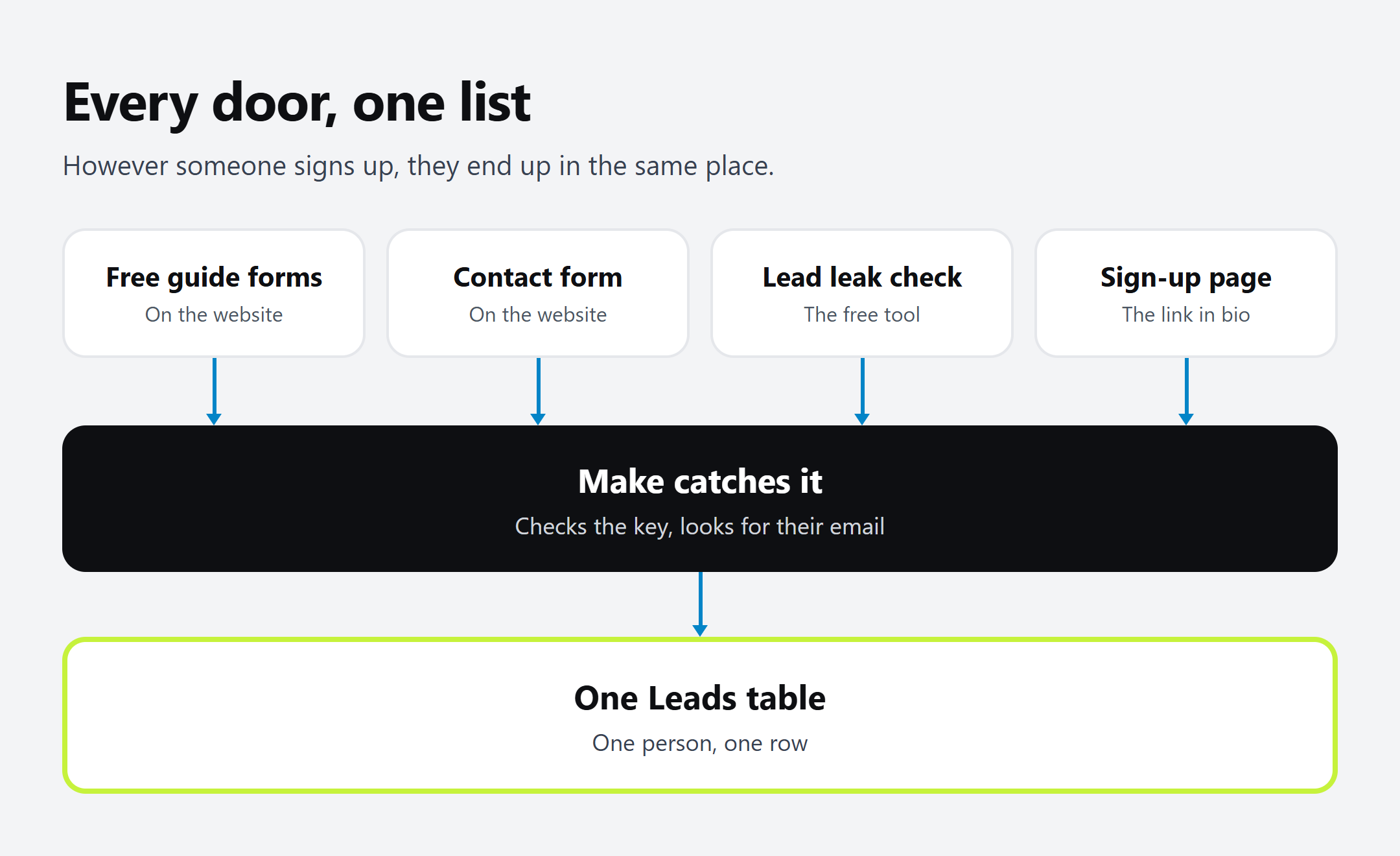
Every door leads to one list
We call each place someone can sign up a door. These are ours today:
All four land in the same Airtable table, called Leads. If you don't have that table yet, start with a simple CRM in Airtable. It's the one thing everything else here plugs into.
Not every door is joined up. People who message us on TikTok don't come through a form, so we still add those manually. We've also built a door for Instagram comment keywords, and it's paused for now while we focus on TikTok.
How the Make.com automation works
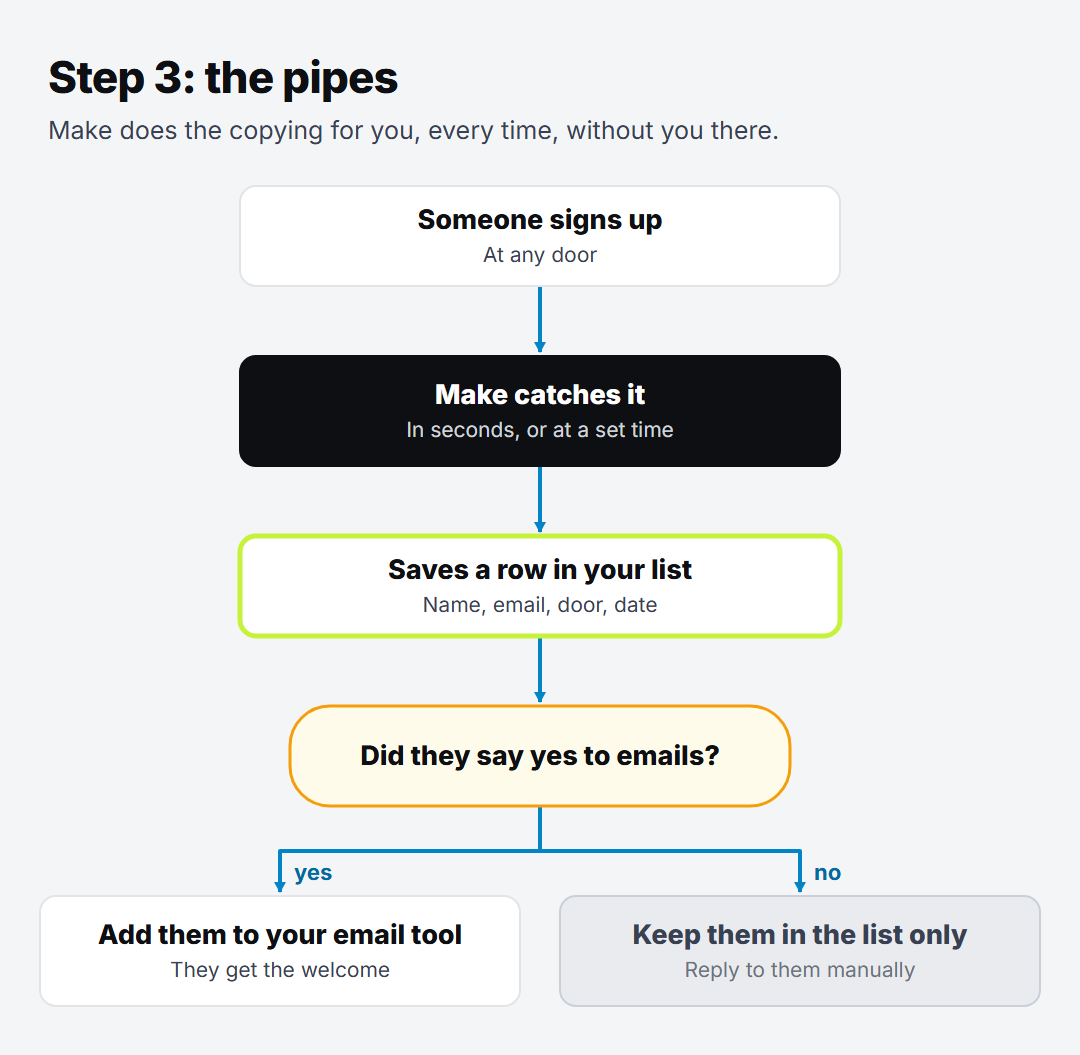
This is what happens each time someone signs up.
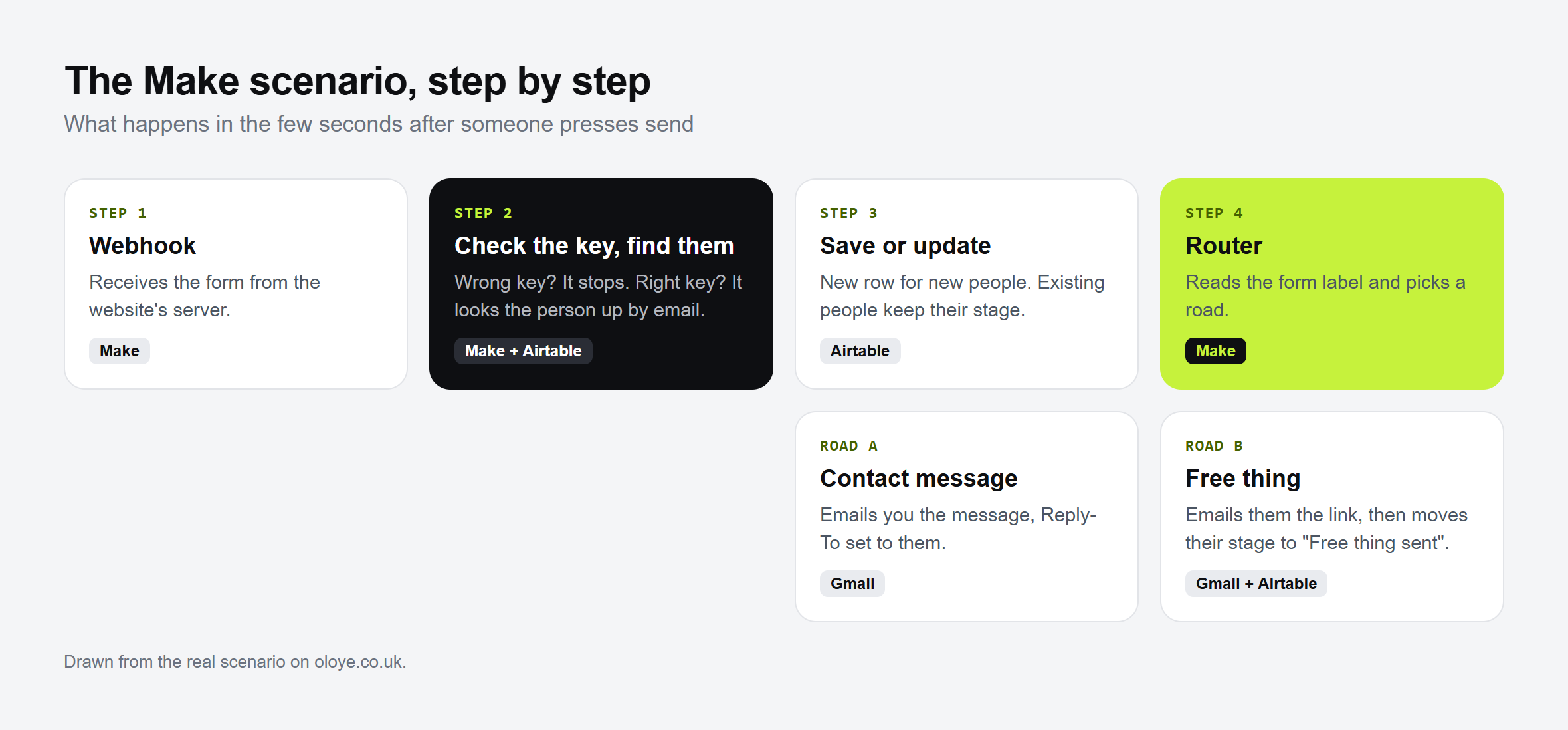
The door sends what it knows. Their name, their email, a label for which door it was, and whether they ticked yes to emails. It goes to a private web address in Make, called a webhook.
Make checks it's really from you. Every send carries a secret key. No key, and it stops there. Nothing is saved.
Make looks for their email in the list. A new person gets a new row, with today's date and the stage "New". Someone already there keeps their row and their stage, and the new message is added under the old ones.
That third step is what keeps the list clean. One person, one row, however many doors they come through.
That picture is the website forms version. We went through it box by box in website forms to Airtable with Make, so we won't repeat it here.
Only the people who said yes
Being on your list isn't the same as saying yes to your emails, so we keep those two apart.
Every row has a tick box for it. Every morning at 7, a second Make scenario looks for rows with the box ticked and an email address, that haven't been added yet. It adds each one to our email list in MailerLite, then writes the date on their row.
That date matters. A row only gets added once, so someone who unsubscribes never gets put back.
No tick, and they stay in the table. They get what they asked for and nothing more.
Good to know: because this runs once a day, our welcome email goes out the next morning, not the same minute. The free guide they asked for still goes straight away.
How to set this up for your own sign-ups
Write down every door you have. Forms, sign-up pages, anything that collects an email. One line each.
Make one table. You need email, which door, the date in, yes to emails, and a stage. Airtable is what we use.
Build one Make scenario for your busiest door. A webhook to catch the sign-up, a search for the email, then add or update the row.
Test it on yourself, twice. Sign up two times with your own email. You should see one row, not two.
Then add the next door. Send it to the same webhook with its own label. No new table, no new list.
Try this: start with step 1 tonight. You may find a door you'd forgotten about, with people still waiting behind it.
Not sure which of your doors is losing people? Take the free Lead leak check. It's 6 quick questions, and you get a score out of 100, your 3 biggest leaks, and the first fix for each.
Oloye builds simple automations that save small businesses time and money, and has been building marketing systems for over 3 years. He lives in Kent with his family, and the whole point is the same for him as for you: more time for the work and the people that matter.
No. In Make you join boxes together. The one thing to change on your form is where it sends its answers, and many form tools have a setting for that. Check your form tool's help page.
What if someone signs up twice?+
Make looks for their email in your list first. If it's already there, it updates that row instead of adding a new one. One person stays one row.
Does everyone who signs up get my emails?+
No. Only the people who ticked yes go on the email list. Everyone else stays in your table, gets what they asked for and nothing more.
Which tools does this use?+
Make to pass things along, Airtable for the list, and MailerLite for the email list. You could use a different email tool, as long as Make can connect to it.